Affiliate marketing on Pinterest offers a simple way to earn income by promoting products you love. Pinterest’s visual nature makes it perfect for showcasing products through eye-catching pins. With over 537 million monthly active users, it provides a massive audience eager to discover and shop for new ideas. Pinterest stands out because its users actively search for inspiration and solutions.
Unlike other platforms, it focuses on evergreen content, meaning your pins can drive traffic for months or even years. For example, 55% of users browse Pinterest with shopping intent, making it a goldmine for affiliate marketers.
|
Statistic |
Value |
|---|---|
|
Monthly Active Users |
537 million |
|
Users with Shopping Intent |
55% |
|
Weekly Pinners Likelihood to Click Retailer Site |
3x |
|
Increase in Buyable Items Saved |
50% |
Starting affiliate marketing on Pinterest doesn’t require advanced skills. With the right tips and strategies, anyone can learn how to affiliate marketing on Pinterest and turn their passion into profit.
What is Affiliate Marketing on Pinterest?
Definition and Basics of Affiliate Marketing
Affiliate marketing is a way to earn money by promoting products or services. When someone clicks on your affiliate link and makes a purchase, you earn a commission. It’s a win-win situation. Businesses get more sales, and you get rewarded for driving traffic to their products. On Pinterest, affiliate marketing works seamlessly because the platform thrives on discovery. Users actively search for ideas, solutions, and products. This makes it easier to connect them with items they’re already interested in.
For example, if you share a pin about a kitchen gadget, users looking for cooking tools might click your affiliate link to buy it.
How Affiliate Marketing Works on Pinterest
Pinterest functions as a visual search engine. Users browse pins, save them to boards, and often click through to learn more. As an affiliate marketer, you create pins that showcase products. Each pin includes an affiliate link that directs users to the product page.
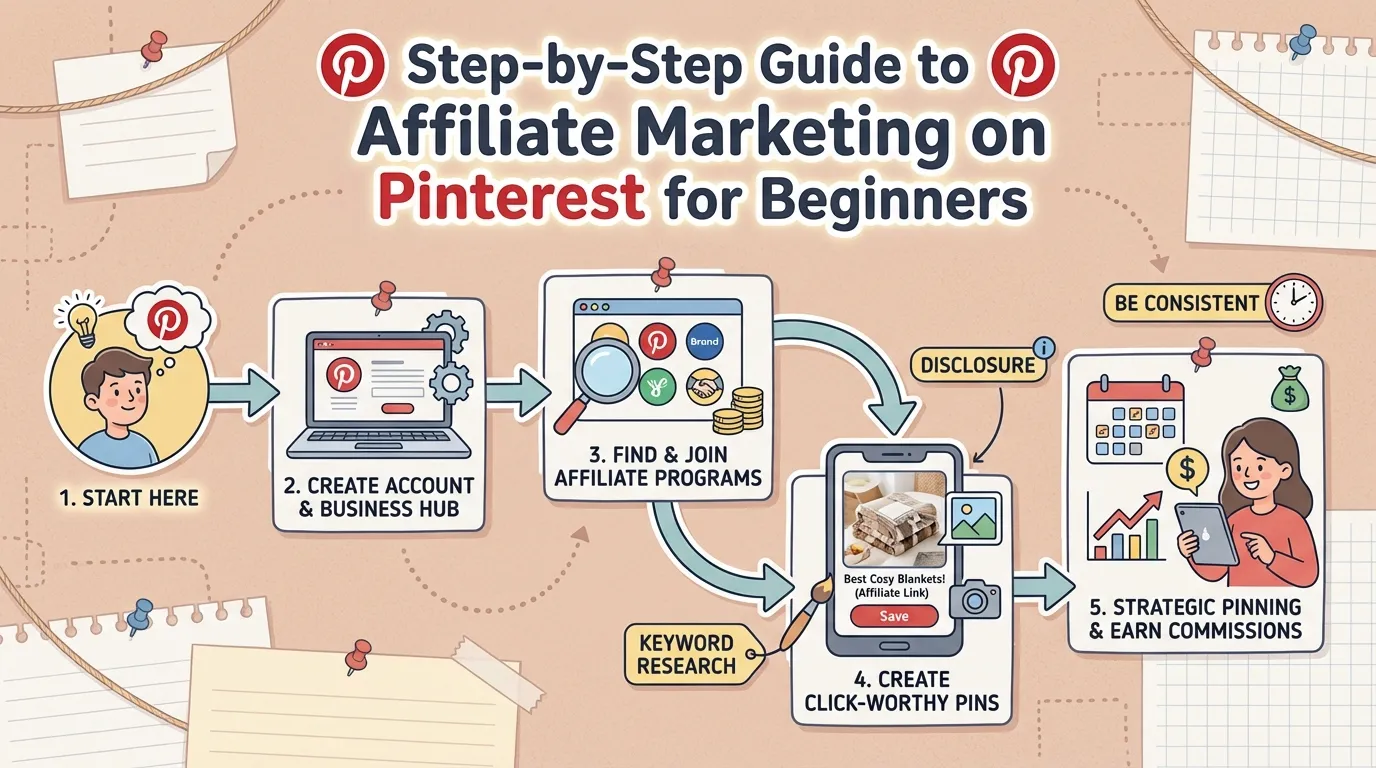
Here’s how it works step-by-step:
-
Choose a product or service to promote.
-
Create a visually appealing pin that highlights the product.
-
Add your affiliate link to the pin description or URL.
-
Share the pin on relevant boards to reach your target audience.
The beauty of Pinterest is its long shelf life. Unlike other platforms where posts disappear quickly, pins can drive traffic for months or even years. This evergreen nature makes Pinterest a powerful tool for affiliate marketing.
Why Pinterest is Perfect for Affiliate Marketing
Pinterest stands out from other platforms for several reasons:
-
Users actively search for products and ideas, increasing engagement with affiliate links.
-
The platform’s visual focus allows you to create eye-catching pins that grab attention.
-
Content can target niche markets, helping you reach the right audience.
-
80% of weekly Pinners discover new brands or products, showing high purchase intent.
-
Pins remain visible for a long time, providing consistent traffic and income potential.
Additionally, Pinterest allows you to embed affiliate links directly in pins. This feature simplifies the process and makes it easier to promote products effectively. For those aiming to connect with buyers, be they interested in beauty or home decor, Pinterest affiliate marketing provides a vast array of possibilities.
Why Use Pinterest for Affiliate Marketing?
Pinterest’s Visual and Evergreen Content
Pinterest thrives on visuals. Its platform revolves around images, videos, and infographics, making it ideal for showcasing products. When I create visually appealing pins, they grab attention and encourage users to click. Unlike other platforms where posts fade quickly, Pinterest pins remain relevant for months or even years. This evergreen nature ensures that my efforts in creating content continue driving traffic long after publishing.
For example, a pin about a trending kitchen gadget can still attract clicks and sales even after the trend fades. To optimize pins for longevity, I focus on high-quality designs and include relevant keywords in descriptions. This strategy helps my pins rank higher in searches, increasing visibility over time.
Audience Demographics and Buying Intent
Pinterest’s audience aligns perfectly with affiliate marketing goals. Most users are women aged 25-44, a demographic known for making purchasing decisions. Additionally, 85% of users plan purchases on Pinterest, and 83% of weekly users buy products based on pins. These statistics highlight the platform’s potential for converting viewers into buyers.
Here’s a breakdown of Pinterest’s demographics:
|
Demographic Aspect |
Statistic |
|---|---|
|
Predominantly Female Users |
|
|
Age Range |
Majority are aged 25-44 |
|
Geographic Distribution |
US, UK, Canada, Australia, France |
|
High Income Users |
40% have household incomes of $100,000+ |
|
Purchase Planning |
85% use Pinterest to plan purchases |
|
Engagement Rate |
83% of weekly users purchase based on a Pin |
These insights guide me in selecting products that resonate with Pinterest’s audience. For instance, home décor, fashion, and beauty categories perform exceptionally well because 90% of users plan purchases in these areas.
Long-Term Traffic and Income Potential
Pinterest offers unmatched potential for long-term traffic and income. Unlike social media platforms where posts lose visibility quickly, Pinterest pins continue gaining traction over time. This means I can focus on creating quality content without constantly worrying about posting new material.
When I use a winning Pinterest strategy, such as targeting niche audiences and optimizing pins with keywords, I see consistent growth in traffic. This steady flow of visitors increases the chances of earning commissions through affiliate marketing on Pinterest. Pinterest’s search engine-like functionality ensures that my pins remain discoverable, making it a reliable source for passive income.
To maximize results, I track performance and adjust my strategy based on analytics. This approach helps me identify what works and refine my efforts for better outcomes. With the right tips and persistence, Pinterest affiliate marketing becomes a sustainable way to earn income while helping users find products they love.
How to Affiliate Marketing on Pinterest: Step-by-Step Guide
Choose Your Niche
How to Identify a Profitable Niche
Choosing the right niche is the foundation of a successful Pinterest affiliate marketing journey. I start by analyzing Pinterest trends and user interests. Popular niches often align with high-demand categories. For example, health and fitness stand out due to their broad appeal and potential for recurring purchases. Beauty is another lucrative niche, attracting users interested in skincare, makeup, and hair care.
To identify a profitable niche, I focus on three key strategies:
-
Research Pinterest demographics to uncover trending topics.
-
Select products that resonate with the audience, such as DIY supplies or fashion items.
-
Create visually appealing pins tailored to specific demographics.
These steps help me narrow down niches that not only generate interest but also drive conversions.
Examples of Popular Niches on Pinterest
Here are some of the most profitable niches for affiliate marketing on Pinterest:
-
Health and Fitness
-
Beauty
-
Home Decor
-
Fashion and Accessories
-
DIY and Crafts
-
Travel
-
Wedding Planning
-
Parenting
Each of these niches offers unique opportunities to connect with Pinterest users and earn commissions.
Set Up Your Pinterest Business Account
Why a Business Account is Essential
A Pinterest business account provides tools and features that make affiliate marketing more effective. With a business account, I gain access to analytics, enabling me to track pin performance and optimize pins for better results. It also allows me to embed affiliate links directly into pins, simplifying the process of driving traffic to product pages.
Other benefits include:
-
Enhanced engagement through visual storytelling.
-
High-quality images that attract clicks.
-
Passive income potential from evergreen pins.
Steps to Create and Optimize Your Account
Setting up a Pinterest business account is straightforward. Here’s how I do it:
-
Create a business account on Pinterest.
-
Optimize the profile with a professional photo, bio, and keywords.
-
Enable Rich Pins to provide more detailed information about products.
-
Start pinning consistently to build a presence.
-
Use analytics to refine strategies and improve performance.
These steps ensure my account is ready to support affiliate marketing efforts effectively.
Join Affiliate Programs
How to Find Affiliate Programs
Finding the right affiliate programs is crucial for success. I look for programs that align with my niche and offer competitive commissions. Platforms like ShareASale and Shopify are excellent starting points for beginners. They provide access to a wide range of products, making it easier to find options that resonate with my audience.
Recommended Affiliate Networks for Beginners
For those new to affiliate marketing, I recommend these beginner-friendly networks:
-
ShareASale: Offers a variety of products across multiple niches.
-
UpPromote: Simplifies program management and performance tracking.
-
Shopify: Ideal for promoting e-commerce products.
These networks provide the tools and support needed to start earning commissions quickly.
Create Boards and Pins
How to Design Eye-Catching Pins
Designing visually appealing pins is essential for driving traffic to affiliate offers. I always focus on creating high-quality pins that resonate with my audience. Each pin should feature a vertical aspect ratio (2:3 or 1:2.8) and a minimum width of 600 pixels. High-resolution images grab attention, while concise text overlays with clear fonts make the message easy to read.
I also ensure consistency in branding by using a cohesive color palette, logos, and fonts. Adding a strong call-to-action (CTA), such as “Shop Now” or “Learn More,” motivates users to click. Testing designs on mobile devices ensures legibility, as most Pinterest users browse on their phones.
Here’s a quick table summarizing the characteristics of high-performing pins:
|
Characteristic |
Description |
|---|---|
|
Quality Pins |
Use high-resolution, visually appealing images. |
|
Engagement |
Encourage repinning and interaction with other users. |
|
Pin Descriptions |
Include keyword-rich descriptions for better discoverability. |
Organizing Boards for Maximum Engagement
Organizing boards strategically helps maximize Pinterest for affiliate marketing. I create descriptive board titles with relevant keywords to improve search visibility. Each board includes a detailed description to provide context and attract the right audience.
To maintain engagement, I curate content thoughtfully and ensure a consistent aesthetic. Joining group boards expands my reach, while Pinterest Analytics helps me understand which boards perform best.
This data allows me to refine my strategies and focus on what works.
Add Affiliate Links to Your Pins
Best Practices for Adding Links
Adding affiliate links to pins requires careful planning. I always ensure the link is relevant to the pin’s content. For example, if I promote a skincare product, the pin should showcase its benefits visually.
Using Rich Pins adds extra details, such as pricing and availability, which enhances user trust. To optimize pins, I include affiliate links in the pin description or URL. This placement makes it easy for users to access the product page. I also track link performance to identify which pins drive the most conversions.
Disclosure Requirements for Affiliate Links
Transparency is crucial when adding affiliate links. The Federal Trade Commission (FTC) requires clear disclosures to inform users about affiliate content. I use straightforward language like “affiliate link” or “sponsored” in my pin descriptions.
Placing the disclosure near the link ensures compliance with Pinterest guidelines. Hashtags like #affiliatelink or #sponsored make the disclosure visible and concise. Adding symbols such as [ad] or [aff] also works well.
Track and Optimize Performance
Tools for Monitoring Pin Performance
Tracking performance helps me boost your affiliate marketing efforts. I use Pinterest Analytics to monitor impressions, clicks, and saves. Affiliate tracking tools provided by networks like ShareASale help me measure link clicks and conversions. UTM parameters allow me to track traffic from Pinterest to affiliate links accurately. Conversion tracking on my website provides insights into the effectiveness of my campaigns. These tools streamline my efforts and save time.
How to Adjust Your Strategy Based on Analytics
Analyzing data helps me refine my winning Pinterest strategy. I focus on metrics like click-through rates (CTR) and conversion rates to identify top-performing pins. Testing new designs and descriptions reveals what resonates with my audience. Understanding traffic sources is key to optimizing campaigns.
For example, if a specific board drives more clicks, I prioritize creating similar content. Continuous testing and iteration ensure long-term success in affiliate marketing on Pinterest.
Common Mistakes to Avoid in Affiliate Marketing on Pinterest
Overloading Pins with Affiliate Links
Adding too many affiliate links to your pins can overwhelm users. I’ve learned that focusing each pin on one product or link works best. When I try to cram multiple links into a single pin, it confuses the audience and reduces click-through rates. Instead, I create individual pins for each product. This approach keeps my content clear and engaging.
Another mistake I avoid is overusing hashtags. Pinterest performs better with a maximum of three relevant hashtags per pin. Too many hashtags make the content look spammy and unprofessional.
I would also ensure my pins don’t appear overly promotional. Balancing affiliate links with valuable, non-promotional content builds trust with my audience.
Ignoring Pinterest SEO and Analytics
Neglecting Pinterest SEO is a common pitfall. I always optimize my pins with trending and seasonal keywords. For example, during the holiday season, I include terms like “gift ideas” or “holiday decor.” Ignoring these keywords can make pins less discoverable.
Analytics is another tool I never overlook.
Regularly analyzing performance helps me identify what works. I track impressions, clicks, and saves using Pinterest Analytics. This data shows which pins resonate with my audience. Without this insight, it’s easy to waste time on ineffective strategies.
Failing to Disclose Affiliate Links
Transparency is essential in affiliate marketing. I always disclose affiliate links in my pin descriptions. Using clear language like “affiliate link” or hashtags such as #sponsored ensures compliance with FTC guidelines.
Failing to disclose partnerships can damage trust and lead to penalties.
I place disclosures near the affiliate link to make them visible. This practice not only builds credibility but also aligns with Pinterest’s policies. Users appreciate honesty, and clear disclosures encourage them to engage with my content confidently.
Neglecting Consistency in Pinning
Consistency in pinning plays a vital role in achieving success with affiliate marketing on Pinterest. When I first started, I underestimated how important it was to pin regularly. Over time, I realized that inconsistent pinning caused my content to lose visibility, and my audience engagement dropped significantly. Pinterest rewards consistent activity, so maintaining a steady schedule is essential for staying relevant.
Pinning consistently offers several long-term benefits:
-
Increased visibility of content ensures that my pins appear more frequently in searches and feeds.
-
Enhanced audience engagement helps me build stronger connections with my followers.
-
Greater brand familiarity leads to higher traffic and conversion rates over time.
To maintain consistency, I use a content calendar to plan my pinning schedule. This tool helps me organize my pins and ensures I post regularly without feeling overwhelmed. I aim to pin at least 10-15 times daily, mixing my affiliate pins with valuable non-promotional content. This balance keeps my profile engaging and prevents it from appearing overly sales-focused.
Consistency doesn’t mean flooding Pinterest with random pins. I focus on quality over quantity. Each pin must align with my niche and provide value to my audience. Following these tips has helped me build a reliable presence on Pinterest and achieve steady growth in my affiliate marketing efforts.
Starting affiliate marketing on Pinterest is simpler than it seems. First, choose a niche that aligns with your interests and audience preferences. Then, set up a business account, join affiliate programs, and create visually appealing pins.
Add affiliate links thoughtfully and track performance using analytics to refine your strategy. Take the first step today. With persistence and the right strategies, you can turn Pinterest into a powerful tool for earning income. 🌟
FAQ
1. Can I use affiliate links directly on Pinterest?
Yes, Pinterest allows direct affiliate links. I always ensure my links comply with Pinterest’s guidelines and include clear disclosures like “#affiliate” or “#ad” in the pin description. This builds trust and keeps my account safe.
2. How often should I pin for affiliate marketing?
I recommend pinning 10-15 times daily. This keeps my content visible and engages my audience. I mix affiliate pins with non-promotional content to maintain a balanced profile. Scheduling tools like Tailwind help me stay consistent.
3. What tools can I use to create pins?
I use tools like Canva and Tailwind Create to design professional-looking pins. Canva offers customizable templates, while Tailwind Create generates multiple designs quickly. Both tools save time and ensure my pins look polished and engaging.
4. Do I need a website for Pinterest affiliate marketing?
No, a website isn’t required. I can add affiliate links directly to pins. However, having a blog or landing page helps me provide more value and context, which can increase conversions.
5. How do I track the performance of my affiliate pins?
I use Pinterest Analytics to monitor impressions, clicks, and saves. For affiliate links, I rely on tracking tools provided by networks like ShareASale or Amazon Associates. UTM parameters also help me measure traffic from Pinterest to my links.